.jpg.b1dbd06907c4be72765505c719534e9b.jpg)

Dacy
-
Posts
1038 -
Joined
-
Last visited
-
Days Won
15
Content Type
Profiles
Forums
Events
Store
Articles
Patch Notes
Everything posted by Dacy
-

Announcing a Base Showcase! ...What's a Base Showcase?
Dacy replied to Dacy's topic in Base Construction
Thank you! Yes, I see them! -
Announcing a Base Showcase! ...What's a Base Showcase?
Dacy replied to Dacy's topic in Base Construction
I need the following people to please list the following bases on the directory, and also I need everyone who has not yet done so, to let me know if they will want feedback, and if they want feedback and/or critique from the CRs. Here is the link to the directory: http://tinyurl.com/mr4dvhyn @Snarky please list MAYHEM (and I do not have your in game global) @Battle-Angel please list HOPE-15001, LIGHT-14474, and ASTRAL-16800 @Dr. Rogue, I don't seem to have your forum name, but you need to list HALLOFMEANWHILE-33491 @Crystal Dragon, you never listed your base, or told me what to list. @Triumphant, please register CORPS in the base directory -
Announcing a Base Showcase! ...What's a Base Showcase?
Dacy replied to Dacy's topic in Base Construction
Submission for @Dr. Rogue: HALLOFMEANWHILE-33491 on Everlasting -
Announcing a Base Showcase! ...What's a Base Showcase?
Dacy replied to Dacy's topic in Base Construction
There's a ton to see in this one! I really love your custom air-hockey and ping-pong tables on the reck deck! I'm also impressed with how you are able to put your zone teleporters so close together without getting the anchors to cross-pollinate. I've never been able to figure out how to prevent that, so I tend to space my teleporters relatively far apart. Looks like you also have plenty of room for expansion. Several decks looked like they had access points for crew quarters or some such. Will be cool to see what you do with these! Thanks, I like the tables, too. I have never had a problem with "cross pollination" (lol, good word); I fill each teleporter before moving to the next, I place the teleport beacons very close to the teleporter; touching if possible. If teleporter is going to have fewer than 10 beacons, yes, you sometimes still get migration if you leave slots open, so I fill with extra teleporters until after the next nearest is placed. But, I did not have to do that with the turbo lift teleporters, and the ones on the deck are fairly close. I consistently place my teleporters close together, so I would say this technique should work for anyone; the times I have come into bases to correct drifting beacons, the beacons were not very close to the teleporter, so they went looking. I have not often had to fill a teleporter to keep it from exploring other options. All three of the inside the base levels have crew quarters lining the halls; I asked the owner if he wanted me to open any and do the insides, but he did not. The build is finished as is (although the owner is mostly not there, so it sits), but yes, there's room for expansion if the owner desired. Did you notice in the captain's quarters and ready room, that the starfields were fake? Thanks for touring! 🙂 -
Announcing a Base Showcase! ...What's a Base Showcase?
Dacy replied to Dacy's topic in Base Construction
@Crystal Dragon, you don't need to guide anyone through the base; you can simply post the code and shard and your in game global here, or message me on Discord and I will post it for you. 🙂 Of course, you should also please make sure the listing in the directory for any and all bases, but especially this one, is up to date. -
Announcing a Base Showcase! ...What's a Base Showcase?
Dacy replied to Dacy's topic in Base Construction
Submission for @S o l a r i s 0-2401 N X S Excelsior Hidden areas; flight capability is suggested. -
Announcing a Base Showcase! ...What's a Base Showcase?
Dacy replied to Dacy's topic in Base Construction
Submission for @Caddaric: COSMIC-770 COSMIC COUNCIL Excelsior COSMIC-8540 COSMIC COUNCIL REVENANT Excelsior -
I think it's more likely that the storage system would get redesigned, because I know they don't like it as it stands, but I also know it's a very tricky and difficult thing to change. So I'm not holding my breath in anticipation, because I have no idea if it ever will be redone. I just know that's the sentiment. But fortunately, it's very possible to hide all of the services, including storage, so at least we have that for now. Probably the reason so many people use the interdimensional shard is because it's small and silent, so we actually already do have a small teleporter. 🙂 But I'm sure it would be nice to have one that's similar in Arcane.
-
I'd like the grouping, copy/paste, or "apply style" (which basically means, do to this piece what I did to that piece, which I know already exists in some form in the editor because it's possible to do it with attachment), and the ability to search for an object and have it highlight or better yet, take you to the object. Also, better organization in the catalog. I am working with a couple of others to do a catalog that you can search by things like shape, size, color, ability to tint, collision, etc., so hopefully we can get that together, but that's a fair amount of work (will take time), and won't be in the actual editor, it will have to be a reference outside of the editor. Maybe we can get a more organized editor at some point. I'd like the editor to show you not only what item you have selected, but what values are in anglesnap and grid. I'd like to be able to manipulate an item I've selected without having to find the grab point. I mean, I can click to rotate it, but I want to be able to lift and turn it more precisely without having to grab it. And yes, it would be nice to be able to "turn off" the ability to grab an item, which would for all intents, lock it into place until you enabled editing again. That would prevent accidental grabs, which I know is the bane of many players. A couple of tips/tricks you may or may not be aware of: hit <esc> to release an item, rather than having to undo it (which won't work if you grabbed storage, anyway). Hold shift to grab the item behind another item. Hold control to target the base instead of items. Item position is determined by the nexus location of the camera view, the mouse pointer, and the nearest surface with the item's attachment orientation. To prevent things from sailing across the base, work with your camera pointed down more than aimed into the distance. Hold control to keep items from changing height. When items move here then there when you are dragging them, likely there are different things that register as floors in the editor underneath that item, and it's finding different location triangulations because the height and placement of its attachment surface keeps changing. To prevent, have an editing surface tile at the level you are working, or close to it. If you find yourself teleporting down to the floor or across the base (camera angle determines where you go), use the command /unbind leftdoubleclick. You will have to renew this each time you enter the editor if you want to use that again. If your leftdoubleclick is not disabled, you can double click in a room of the base, and the editor will teleport you to that spot. That only works on floor spaces, not on a filled in section on the top of it. Filling in the entry room will stop you from being yoinked there when you first enter editing, but you will still end editing as close to the entry room as the editor can get you. When trying to get items placed either very close to a base wall (some items get stubborn and don't want to place too near the walls) or even just outside of it, if you are in a base room that's smaller than the very largest 24x24 room and not on the very edge of the plot (with no space to move to), then you can try this technique: add a temporary room on the side where you wish to place the item. Put a doorway between the temporary room and the room you want to work in. Place the item, making sure the grab point is not farther away from the room than mid-line in the doorway between the two rooms. Now you can delete the temporary room and see if the item stays. It should stay as long as it's on the half of the doorway that belonged to the room you wanted to place the item in or near. If it didn't stay, hit undo (ctrl/z) and try placing the item again. More tips as I think of them. 🙂
-
YES!!!!! Usually you can stop doing this by typing /unbind leftdoubleclick. Most don't know that you can double click on the floor of where you want to go in a base and it will teleport you there when in edit mode; this gets rid of that, and usually, the flying across the base that goes with it.
-
You will always return to the entrance room or near to it, if it is filled, when leaving the editor. If you made a bigger room outside of the entry room, open your map and you should see it. If you have doubt that the editor did indeed place the larger plot, go back into editing mode to check, there's no real workaround there, but I've never had it fail that task. The system will put messages up that the whole sg can see as to what you are doing, though, so that is one way to check, especially as the build gets bigger and memory issues and lag sometimes mean a move didn't "take", if working in one large room, so that feedback is there to confirm, yes, you bought that next piece, which means it's placed somewhere. Now, that will only record "buying" and "selling" items, not moving them.
-
It's the interface we all have to use to build our bases. How is that working for you? I know there are lots of suggestions out there (we did a poll), but here's a place to also note frustrations and perhaps find options that will help. Some may not love the editor...maybe all of us don't love it! But we do love what it can do. Here is also a great place to note any tricks you've discovered that let you do things you didn't think you could do. I will ask that this topic be pinned if there is a lot of interest in keeping it easy to find. If not a lot of people need it, it'll slowly drift away...
-
I do want to apologize, @Excraft, for going into details I should not have. I doubly apologize if your in game global is not Excraft, for that is who I had contact with, and that Excraft is still on my global list. But I should have let that whole post sit for a good while before I posted, it likely would not have seen daylight. I also basically let this become more of an argument than a discussion, and let the feeling of offense translate into saying more than was needed or good. I am sorry for that; from the start I should have acknowledged that all feelings here are valid for that person, and we need not think poorly of ourselves or others because their experience differs from ours. No, I still don't think the editor itself is buggy, and I do feel that the controls are simple, but the process itself is time consuming and there's a definite learning curve. It's like picking up a paint brush. Simple to dip into the paint and put to canvas, but painting with skill is going to take learning the finer points and working until you master them, and everyone is different in approach, style and the time it takes to do something they are satisfied with. Everyone can paint as in, put paint on brush and put on canvas, but how much time you want to invest to get to where you're happy varies with each person according to their motivation and time. And I understand that no matter what I think, some of you are convinced by your own experience that there is nothing simple or easy about the editor, and for you that is also true. Easter Bunny and I talked, and realized there's no place here where you all can express your frustration with the editor or suggest improvements (just want to do a reality check on suggested improvements, tho; I've said in this thread many times, the chances of big improvements to how the editor functions is low, and it is unlikely to gain functions that will allow beginners to do complex projects in a short amount of time), but yeah, who knows, right? Maybe there's something someone would suggest and the devs might say, you know? We might be able to make that work. They surprised us by fixing base shift, and that was the number one thing on the poll we did a couple of years back, and tbh, we didn't think shift was something they COULD fix. So I'll be making a topic for commentary on the editor, and yes, we know there will be negative comments. However, if there are problems people have that I know how to counter, I will also be giving information on how to deal with that editor oddity. 🙂 I will try to be careful not to sound like people who are frustrated have no right to express it; I'm only here to try to offer things that might help, Thanks for giving me more experience in understanding where people are coming from.
-
Announcing a Base Showcase! ...What's a Base Showcase?
Dacy replied to Dacy's topic in Base Construction
Also, please let me and/or Easter Bunny know if you want feedback from us, and let us know if you're looking for that feedback to tell you what you're doing well, or more along the lines of what could be improved and how. We're not going to give critique unless it's asked for. 🙂 Don't forget to please put up a sign or afk Character with your preferred method of contact, as well, so people can send you comments if you want those. Some may and will comment here as well, but many will not, but sending a tell or an ingame email is easy. -
Announcing a Base Showcase! ...What's a Base Showcase?
Dacy replied to Dacy's topic in Base Construction
Pro tip: the Nightward sky is always night, so lights that only light at night, are on all the time! It's also in the placeable skies, in case you want another sky for most of the base. The fx of any sky are only visible while your character is under that sky. REMINDER: all bases need to be entered into the base directory https://tinyurl.com/HCbasedirectory Please be sure to enter or update your bases! 🙂 (Bases that were previously on the old directory have been added to the new, but this is your chance to make sure it's described accurately and its status is set to what you want. Do you want visitors to be able to just stop in? Or would you rather they messaged first? Etc. The process is simple and quick, you just choose words from dropdown menus. -
Announcing a Base Showcase! ...What's a Base Showcase?
Dacy replied to Dacy's topic in Base Construction
Oh, and, officially enter ONES-5030, Excelsior. This is not a possible entry into any contest, but it's sitting unused for the most part, and I'd like for it to at least get seen. Flight is good if you want to cruise around the outside of the space ship (accessible through shuttle bay). Has some Trek flavor by request, a little BG and Expanse thrown in as well. Maybe a little Bab5 in the arboretum.... -
Announcing a Base Showcase! ...What's a Base Showcase?
Dacy replied to Dacy's topic in Base Construction
Yay! Reunion! The smaller shards get at least one to represent! 🙂 One of the things about a showcase is, you can see what others have done, and I LOVE that you are visiting and commenting!! You can learn from what you see, and you can make an informed decision as to whether or not you'd like to try to enter the contest next year (and you have time, now, to work on improving if you care to). Now is the time to ask questions and soak it all in. 🙂 I will describe my method of making a sign, hopefully this translates: First of all, as with any fine detail, get close. The editor places things according to where the mouse is in relation to your camera angle, and the type of surface your item is oriented to. Watch your item window to make sure you're not grabbing other things across the base by mistake, if that happens to you frequently. Now to place letters: (here, I'm using tiny letters and the back of a shower floor) Hit F1 and disable grid. Get out a shower floor and hold control and alt at the same time, and rotate it until it's standing upright on its side. If the side without the drain is not facing the direction you want it to, hold shift and alt and rotate it around until it's facing the correct direction. Get out a surface tile, no collision, 32x32. The shower floor is seen as a floor by the editor, so the surface tile, which wants to attach to a floor, will place and stay level if you position it using your mouse pointer on the surface of the shower floor. Click to place. Now go to whichever set of tiny letters you want to use, PCity or Motiva. Motiva has a lower case as well as an upper case, and if you use lower case mostly, you can fit more on your sign. Select a letter. Hit F5 twice. This will set the letter attachment to "surface". Place the letter so it's facing up on the surface tile. Now, for this first letter, you can set the color you want, and all the following letters will be that same color, so choose the color. I choose black, using the small black/grey/white three square color choice, not the gradient scale (that's the darkest black). Now, HOLD CONTROL and slide the letter over to the floor tile (I would recommend placing the letter close to the floor tile) until the letter pops upright on the floor tile. Release the mouse hold before you release control. This allows you to align the letter precisely to the surface level of the surface tile, without having to adjust the height more. Repeat until all the letters are on the shower floor that you want on that line. IMPORTANT: if the letters do not attach in the upright position, if they want to stand up upside down or sideways, that is because the surface is upside down or sideways; items on surface attachment will attach using the orientation of the surface they are attaching to. So, if the letters want to attach sideways or upside down, instead of having to click each letter to reorient it, put that first letter back on the surface tile (if it's crooked on the surface tile, that does not matter, only final placement matters) and select the shower floor again (check to be sure you have it selected by looking to the item window, it should appear there if that's what you have selected). Right click to make the surface upright; if the letters were upside down, you'll need to right click twice. Click rotation is always 90 degrees and always counter-clockwise, so if you're using the square shower floor and your letters were sideways, I can't tell you how many clicks will make it be upright, you'll have to experiment if knowing the direction it rotates doesn't help you figure out how many clicks to make). I know that all sounds very complicated, but it's a long explanation for a pretty short process once you understand how to do it. Call for help (pref on my Discord so I can answer faster) if you have problems with this. Now, if the letters aren't arranged and spaced the way you want them, again HOLD CONTROL and make sure you are clicking ON the letter itself, and move the letter to where you want it. The Control key will keep it on that same height line, and you can move the letter by mousing over the shower floor anywhere. If you grab another item instead of the letter (watch the item box or window) quickly hit escape, and the editor will let go of what you accidentally grabbed. If you accidentally clicked and the editor completed the action you didn't mean to complete, hit control/z to undo it. Again, especially for this part, being close is a good idea. I hope this helps. Again, call for help if you're confused. I can quickly demonstrate. -
Announcing a Base Showcase! ...What's a Base Showcase?
Dacy replied to Dacy's topic in Base Construction
No, you can't do much with the NPCs. This would be a character of yours that you can leave in the base; maybe a separate account, if you have another account. Otherwise, I would make a sign. -
Announcing a Base Showcase! ...What's a Base Showcase?
Dacy replied to Dacy's topic in Base Construction
Just a note, be sure to send comments also to builder, and if you want others to know, put it in the directory please! (See link either above or pinned to base building). 😄 -
Since the last page, I have had several people who've experienced this problem, and called for help. The problem is, they attach teleporter beacons to a teleporter, and then when they go to use it, the teleporter says that there are no beacons attached, even though the person is the right alignment to be able to see the beacons, and they could SEE that the beacons were attached when they were in the editor. Going back into the editor confirms this. I do not yet know what is triggering this error. However, the fix is simple: leave your base for at least 6 minutes without anyone else in the base, either. This "resets" the base, and it clears system errors like this that are usually related to the memory cache, I believe. So if you go to a teleporter that you know should be showing you destinations and it's not, leave, wait 6 minutes, and come back in, and see if that fixes it.
-
- 2
-

-
Announcing a Base Showcase! ...What's a Base Showcase?
Dacy replied to Dacy's topic in Base Construction
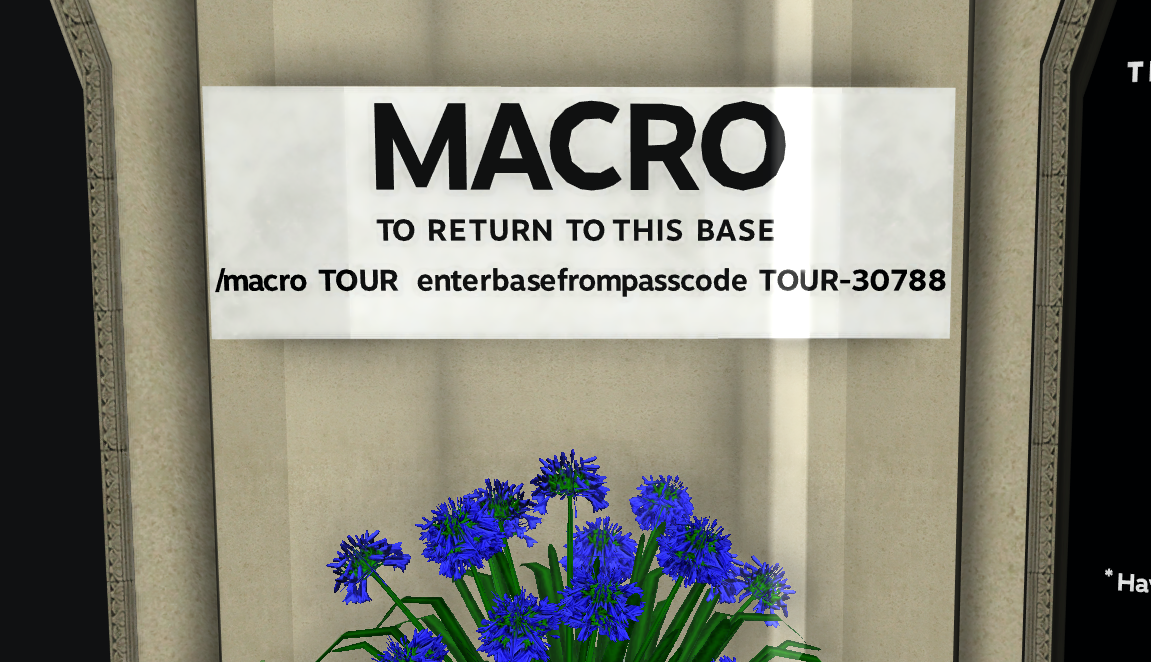
I should have included a link, my bad. It's pinned in the topics here, in the Builder's Discord, in the HC Discord in the base topic, also. https://docs.google.com/spreadsheets/d/14DqavAx6ov60d92rhvwy2sNEW_909MCHp421GM4q-Yk/edit#gid=0 Just follow the directions. If you do not yet have a base passcode, then get out the character who's got editing permission for the base you want to get the code for, and type in game: /sgpasscode [word or code I want]. For instance, I'm making touring hubs for each of the shards so people can go base to base and have the codes right there. When I made the code for Excelsior's base, I typed: /sgpasscode TOUR . In the global tab, the system sent back: Your supergroup passcode is now TOUR-30788. If I want to change that, I'll re-enter the word I want, but the number it sends back is always the same. For a sign: Use the alphabet letters on the surface of something. (It is usually easiest to use f5 to change the attachment to surface, and use an editing surface to keep them on the same level) I like to use the back of shower floors as my sign. A small sign might be on a Modern Picture Frame (wall details tab), but note you will need to change the color of the (usually white) letters if the background is white. You only have to change the color the first time, after that, they are all set to the same color until you either get out of the editor, or change it. So when you finish, you'll have a sign. Here is an example. The sign should be set up somewhere where people see it near the entry. Or you could choose to have a character with an afk message (against a dark background is best). That would look like this: What you choose to say here is very limited, so best to put something like what I have. To do that, type /afk my message here . The /afk part won't show up. These are only if you want to hear comments back from people, it's not a requirement. However, definitely we want the base listed in the directory, so that people not using the hubs can find it. NOTE HERE: I have changed the original post to reflect that you can enter more than one base if you would like. And naturally, feel free to enter bases in whatever category best suits them.
-
Tbh, I don’t go many places on the forums but here. I can’t speak to what others do; but I’m saying I don’t see a suppression of negative reactions here, and I know I’m not leading a charge against it. I just don’t like being told that I’m lying because of a difference of opinion. I am sorry you both felt like you were being called a liar because it was harder for you than others. That’s exactly what I was just protesting, from the other side. I guess when having these disagreements, it’s wise to keep in mind the validity of perspective. It’s difficult for you, you regard the necessity of flipping a piece upside down so it looks like it has a bottom as unnecessarily onerous, and yeah, it would be nice to not have to do that. But for others, it’s just something to take in stride. I agree, commiserating is a good vent, problems need to be pointed out to be solved, and I’m definitely pondering why at least two people got the impression from my videos that building wouldn’t take the time it takes. However, the hot keys are such a huge improvement over what it used to be, those of us who remember, I think, are going to proclaim how great they are, because they are. But they don’t make this an effortless editor that takes little time to do complex things. It DOES get better. But it’s not to everyone’s taste.
-
teleporters not connecting to their attached zones
Dacy replied to Snarky's topic in Base Construction
I said (elsewhere) there are very few. This one just showed up since last patch. -
THIS. Believe me, it’s on the list we have asked for.
-
teleporters not connecting to their attached zones
Dacy replied to Snarky's topic in Base Construction
I've put up announcements in my Discord (where you are a member, Snarky) and on HC in base building, there is a known issue where beacons are not showing up for some reason. The editor will show them as attached, alignment is correct to be able to see them, but when you go to use the teleporter, it says there are no beacons. The fix is, actually, to leave the base without someone in it for at least 6 minutes (with no one in it). So, that's the fix, and you wound up doing exactly that. I guess I should make a post here on the forums, too, maybe more will see that.