
AboveTheChemist
-
Posts
2070 -
Joined
-
Last visited
-
Days Won
1
Content Type
Profiles
Forums
Events
Store
Articles
Patch Notes
Everything posted by AboveTheChemist
-

I've Recreated The Binds That Tag Badges For HeroStats
AboveTheChemist replied to BovineAvenger's topic in General Discussion
Thanks BovineAvenger! You have the distinction of being the first person in the many years that I have been using this username to know that it was a Sisters of Mercy reference. Only a few have known (or at least only a few have mentioned it) what the logo is. I did confirm the other night that the character limit is 256 characters, so that latest zip file I posted is as good as it is going to get. I still have not tested that new file set but I feel confident it should work as well as the first set I posted. If you find anything amiss just let me know, and if you have suggestions for improvement I am all ears! -
I had this same thing happen to me today. I am 100% certain it was a bug and not user error. I am not able to post full details at the moment but I will do so tomorrow.
-
I ran across this reply earlier today, which mentions a way of binding double clicks. I haven't tried it myself though.
-
I've Recreated The Binds That Tag Badges For HeroStats
AboveTheChemist replied to BovineAvenger's topic in General Discussion
I adjusted the files slightly to squeeze in as many /settitle commands as possible per key press, and still stay under the 256 character bind length limit. I've attached the new zip. Instructions are the same, but the last file is st232.txt instead of st301.txt, which should reduce the number of key presses by about 25%. I have not tested these so if there are any issues just use the previously posted zip and I'll fix these when I can. I've since tested these and they seem to work fine. Also, I am not 100% certain the bind length limit is 256 characters, so if anyone knows for sure what it is please let me know. If I have time I may test it this evening. EDIT: Deleted outdated file -
If this is something anyone is still interested in, I have been working on a way to check my own badges using /settitle, which includes a means of easily cataloging the integers that go with each badge. See my most recent posts in this thread. My issue is that I am not very hardcore about badge collection so I'm only able to complete a small part of the entire list, and would need others with more/different badges to use the tools I posted in that thread and provide me their logs. For anyone that is still reading and wants to help, the only caveat is that the tools need to be run as provided in that thread (aside from changing the keybind key if so desired), because my parser relies on the feedback those tools provide. Feel free to contact me with questions or if you want to help, and I can explain further.
-
I've Recreated The Binds That Tag Badges For HeroStats
AboveTheChemist replied to BovineAvenger's topic in General Discussion
I think you are right, I moved that to my ESC key. If that is the case then I think you can replace the 'nop' in st301.txt with 'powexec_abort'. You might also be able to put: Z "unbind Z" Which should return it to it's default setting, but I don't know if it will accept a key that unbinds itself. Worst case, you can do /unbind Z on the chat line once you are done. -
Were you killing Echidna in Who Will Die, part 1? When I did that arc, I had a similar experience. For a while, logging to character select and back in was enough to reset the mission, but at one point it stopped working, and after trying various means of logging, I ended up just playing another character for about 15 minutes and it went back to normal.
-
I've Recreated The Binds That Tag Badges For HeroStats
AboveTheChemist replied to BovineAvenger's topic in General Discussion
One thing that I will add is that if there is enough interest in compiling a list of settitle integers and their corresponding badges, I am happy to help with that. As I noted previously, the integers do not match what is on the wiki list. For instance, in my previous post, Celebrity is 5, Sensation is 6, Superstar is 7, and Tough is 8. On the wiki those badges have integers in the 1500 range. I am not a hardcore badger, and my highest is only now nearing 500, so with my characters alone I could only complete part of the overall list. If a dedicated badger with lots of badges is willing to run this and share their logs, I would be glad to parse the data and start fleshing out the integer list. -
I've Recreated The Binds That Tag Badges For HeroStats
AboveTheChemist replied to BovineAvenger's topic in General Discussion
After checking all my characters I am satisfied that these files work as intended. I've attached them here if anyone else wants to use them, at your own risk of course. I changed the execution from how BovineAvenger originally posted. Rather than cycling through the NUMPAD keys and loading a new bind file once that cycle was complete, I use one key and reload the next bind file automatically with each keypress. It was simpler for me that way. My Z key was not bound to anything so I chose to use that key. If your Z key is bound to something, you have two options. You can export your current keybinds and copy your current Z bind into file st301.txt in the attached zip. That file is the last in the sequence and resets the keybind to its original state (which is 'nop' in my case). The second option, which assumes some basic familiarity with Python and how to run Python scripts, is to choose another (preferably empty) key and to rebuild the files yourself using the Python script (bt_builder.py) included in the zip file (it's in the badge_title folder with the rest of the files). If you choose the second option, you'll need to modify that Python script on line 1 to use a key other than Z. Just set the 'bind_key' variable to whatever you want to use. Running that script will replace the included files with your custom files. If you aren't familiar with Python I don't recommend this step, but Python isn't a particularly daunting language so it might not be hard to figure it out if one is so inclined. Any basic Python interpreter should allow you to modify and run the file, and you can get one from https://www.python.org/downloads/. This is written in Python 2, so be sure to use a Python 2 interpreter. So, to use the files: 1. Drop the badge_title folder from the zip file into the 'data' folder in your CoH directory 2. Using either the Z key or the new key of your choice, based on your options above, bind a command that looks something like: /bind Z "tell $name, BEGIN BADGE TITLE SET$$bind_load_file badge_title/st0.txt" 3. Press Z (or the key of your choice). This loads the first bind file, and sends you a tell that the process has begun. It will look something like this: 2019-08-06 20:49:48 Keybinds file loaded: badge_title/st0.txt 2019-08-06 20:49:48 [Tell] :Mitternacht: BEGIN BADGE TITLE SET 2019-08-06 20:49:48 [Tell] -->Mitternacht: BEGIN BADGE TITLE SET 4. Press Z (or the key of your choice) again to set the first batch of titles. It is set up to do ten badges per keypress. The output will appear similar to the below, individual badges notwithstanding. 2019-08-06 20:50:23 Keybinds file loaded: badge_title/st1.txt 2019-08-06 20:50:23 [Tell] :Mitternacht: 0 2019-08-06 20:50:23 [Tell] -->Mitternacht: 0 2019-08-06 20:50:23 Your badge title has been cleared 2019-08-06 20:50:23 Your badge title has been cleared 2019-08-06 20:50:23 Your badge title has been cleared 2019-08-06 20:50:23 Your badge title has been cleared 2019-08-06 20:50:23 Your badge title has been cleared 2019-08-06 20:50:23 Celebrity has been selected as new title. 2019-08-06 20:50:23 Sensation has been selected as new title. 2019-08-06 20:50:23 Superstar has been selected as new title. 2019-08-06 20:50:23 Tough has been selected as new title. 2019-08-06 20:50:23 Your badge title has been cleared With each keypress, the first action taken is to load the next bind file. Then it sends you a tell with the index number of the first badge in the list. Then it sets the badge titles in numerical order from 0 to 9. 5. Keep pressing Z (or the key of your choice) about 300 times to cycle through all the possible numbers. I spaced my keypresses by about 1-2 seconds so that I wasn't spamming the game too hard. I can't promise it will work right if you spam it faster than that, but knock yourself out if you want to try it. 6. When all the numbers have been set, it will tell you that the inventory is complete. Press the key once more to return the key to its original binding. It takes me about 10-15 minutes per character to cycle through all the keys. The main reason I included a tell to myself in there was so that the game would beep and I'd have audio feedback that things were working well. I just started watching TV, pressing Z, and listening for the beep to know that all was working right and I didn't have to pay too much attention to it otherwise. If you are familiar with Python feel free to modify the included python script to suit your needs. I am not a Python expert so there is probably room for improvement there. If you have any questions just let me know. (See post further down for updated zip file) -
I've Recreated The Binds That Tag Badges For HeroStats
AboveTheChemist replied to BovineAvenger's topic in General Discussion
After some digging, I found some more typos in the badgetagger.txt files, and I believe that is why I was missing some badges after running these files. I created my own set of files using a Python script and did a test run last night. It appears to have successfully picked up all the badges for the test character. I plan on running the rest of my characters tonight to test it further. As I ran the test, I added the ability to roughly keep track of the integers for the settitle command, and comparing those numbers to the Paragon wiki settitle integer listing, the integers that Homecoming uses do not match for a subset of badges that I checked. It does not appear that the wiki list can reliably be used to set one's badge title with the settitle command. At this time I don't plan to share the files I have but if there is interest I am not opposed to doing that, once I am done testing it to make sure everything works fine. -
My thanks to you both. There were already several cool teleporting tricks (like the LFG menu) but this one seems to have them all beat.
-
Just so I am clear, because this sounds too good to be true, but using the /enter_base_from_passcode command as described above will allow me to teleport into any base for which I have an access code, from anywhere within the game? If true, is there a variant that will let me teleport to my own base, or do I need to create a passcode for my base and just use the /enter_base_from_passcode command with that passcode?
-
As you have presented it, you would lose the set bonuses with the non-attuned set if you exemplar below level 32, since the set level is 35. With the attuned version, you could exemplar as low as 22 and still keep the set bonuses. Also I think you are stuck with whatever % bonus those enhancements offer at 35, whereas if you had attuned versions, they would increase in power as you level up to level 40. At least, that is how I understand it.
-
I've Recreated The Binds That Tag Badges For HeroStats
AboveTheChemist replied to BovineAvenger's topic in General Discussion
I ran these last night and found a few typos in badgetagger5.txt. The first is in the bind command for SHIFT+NUMPAD1. It currently reads (in part): SHIFT+NUMPAD1 "settitle 2969$settitle 2970$$settitle 2971 The second settitle command only has one $ preceding it. It should read: SHIFT+NUMPAD1 "settitle 2969$$settitle 2970$$settitle 2971 The other typos are in the bind command for SHIFT+NUMPAD2. The end of that line reads: $$settitle 2999$$settitle” That empty settitle command at the end causes an error (I think), and that end quote is not the right kind. The end of that line should read: $$settitle 2999" It took me a while to figure out that the quote style was wrong, and it's possible that the empty settitle is fine and that it was just the quote style causing the error all along. Since mid-May, I have been keeping chat logs and updating my badges by parsing those logs. I've noticed that my badge count in-game is off slightly from what my parser tells me. I decided to try these badge tagger files to see if that would help illuminate the badges that I am not picking up, but these files miss some badges too. I am going to keep digging into it and see if I can turn up anything. -
From another thread a few days ago:
-
I built my first base about a month ago. If I had a nickel for every time I had to blow something up and start over, I'd have a sack full of nickels. Learning the tricks was definitely a trial and error process. You may know this already but when placing the water, you can hold shift when clicking the water surface to raise or lower it. That may help with creating the pool effect. I created a nice little pool in my base using that technique. If you are making a natural pool, there is a gravel floor surface in there that makes a great bottom for natural pools.
-
Zoning into the base, either via the portal or via a rez bay, always results in the character facing south. There is no way to change it that I know of. For water, look in the 'surfaces' tab after you click 'place item'. There are various water surfaces (calm, rough, etc) in there of varying sizes that you can place.
-
I use NUMPAD 1-8. I prefer using two hands on the keyboard so team selection, targeting, and most of my powers are accessed via the number pad and key combos.
-
Checking my logs, I see just over 80 miner strike alerts over the past month on Everlasting, and I only play about 4 hours a day, mostly in the evenings Eastern time. I made a dedicated chat tab just for hero/villain zone alerts, so if I run a mission or three, once I am done I can check that tab and see if there are any ongoing zone events I want to attend.
-
This is a bit of a stab in the dark, but if you are comfortable going into the BIOS you might try disabling the integrated graphics processor in the BIOS. That is what I did on my laptop, which is a couple of years older than yours if I have my dates right.
-
I thought you just used the /boost and /boostset commands to give yourself IOs. See this thread.
-
Market Bug: Different Items are sharing sales history.
AboveTheChemist replied to Adeon Hawkwood's topic in Bug Reports
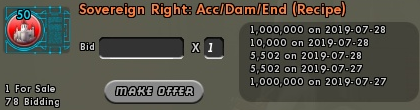
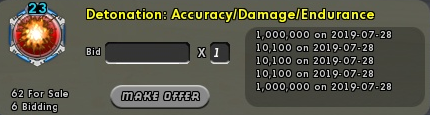
Adding a few more I found. The Sovereign Right IO is a repeat but I noticed the recipe seemed bugged too so I wanted to show the IO from the same time in case there was any question if the IO and recipe might be linked.
-
I tried adding the following line to my keybinds file to serve as my quick key for changing the priority target name. CTRL+NUMPADENTER "beginchat /bind NUMPADENTER "target_enemy_near$$target_custom_next enemy alive "" When I press CTRL+NUMPADENTER in game, though, it gives an error because all it sees is the part between the first two quotes (i.e. beginchat /bind NUMPADENTER ). Is there any way to get the keybind file to treat the second and third set of quotes as text rather than the start/end characters of the bind. Like an escape character or something? Without going into too much detail I fiddled with this a LOT but never got it to work the way I want. I subsequently found a less optimal but otherwise sufficient solution but I wanted to appeal for help to see if I could find a solution using the original implementation above.
-
I've seen several posts by GMs on discord that lead me to believe that they will rename a SG without much fuss, you just need to file a ticket for it.
-
I've never gone through Ouro to do this part of the SSA. I just go talk to Theoden and he exemplars my 50 down to 20 and off I go. Same with my 30ish character when she did it.